
Gray Zone Warfare
Price
Select option
Quantity
Your key is delivered to your account instantly after payment — no email needed.
Screenshots
How delivery works
The moment your payment clears, your license key is issued and shown on your order page.
The download for this product's loader sits right under your key — no emails, no waiting.
Step-by-step launch instructions for this product are on the same page.
About Gray Zone Warfare
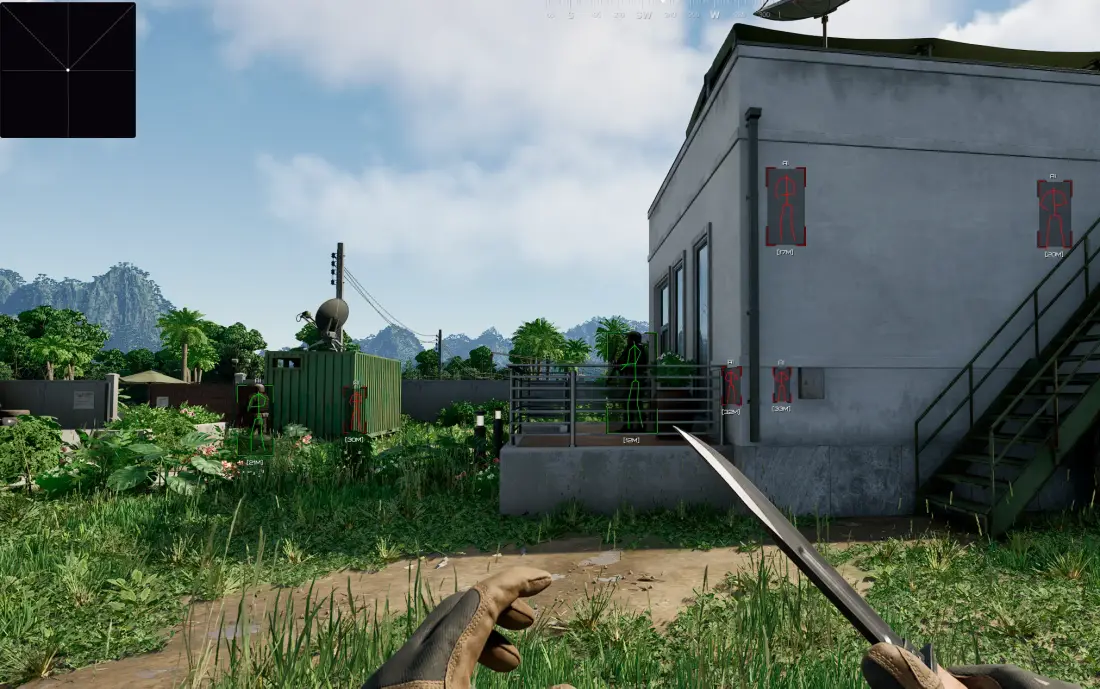
Phoenix is a functional ESP-software for Gray Zone Warfare, focused on getting the maximum information about what is happening on the map without being overloaded with unnecessary mechanics.The basis is a detailed Players ESP: display of players and bots with boxes, skeletons, distance, lines, and the Visible Check system. Allies can be filtered, factions can be displayed, and targets in vehicles and corpses can be shown. All elements can be flexibly configured by color and distance. Loot ESP is implemented at a high level: display of containers, items, and their types (weapons, medicine, armor, ammunition, etc.), including a list of nearby loot directly on the screen. This significantly speeds up looting and orientation.The functionality is complemented by a user-friendly radar that displays players, loot, and containers. Phoenix is a balanced solution that focuses on visual control and a comfortable gaming experience.
Features · 39
Players ESP for Gray Zone Warfare (GZW)14
- Enabled — Enable/Disable ESP
- Players ESP — wh against players
- Bots ESP (Ai) — wh against bots
- Visible Check — players behind the wall and in line of sight will be colored differently
- Corpse — corpses of players and bots
- In Vehicle — show players in vehicles
- Boxes (Corner, 2D Boxes, Filled) — wh in the form of boxes
- Skeleton — wh in the form of skeletons
- Distance — distance to targets
- Snaplines — wh in the form of lines
- Max Distance — limit the operating distance of the ESP
- Custom Colors — setting colors for ESP
- Enemy Only (If this option is activated, the ESP will not show allies)
- Team Name (Show player faction names)
Loot ESP for Gray Zone Warfare (Items)16
- Loot Boxes — show the location of the boxes with loot
- Loot Boxes Condition — state of the boxes (closed or open)
- Dropped Items — showing items lying on the ground
- Item Type — item type (weapon, ammo, etc.)
- Item Name — names of items
- Loot List — show a list of nearby loot as a list in the corner of the screen
- Weapons — ESP loot shows where weapons are located
- Attachments — show weapon modules
- Ammo — ammunition location
- Provision — items related to food/drinks
- Armor — various armor and other clothing
- Containers — objects that contain other objects
- Medicine — items related to medicine and treatment
- Grenades — show grenades
- Max Distance — set the maximum range for Loot ESP
- Custom Colors — customize colors for items to your taste
Radar for Gray Zone Warfare (GZW)7
- Radar — a radar appears on the screen showing various information
- Scale — radar scale
- Size Point — size of points on the radar
- Players — show players on the radar
- Dropped Items — show loot on the radar
- Loot Boxes — show loot boxes on the radar
- Colors — the ability to customize colors for the radar
Misc (Other Features)2
- Language (English, Russian) — ability to switch languages in the cheat menu
- Hotkeys (Players, Items, Loot) — key binding for activating ESP sections
Requirements
- Operating system: Windows 10, Windows 11 (21H2, 22H2, 23H2, 24H2, 25H2)
- Processor: Intel & AMD
- Video card: Nvidia & AMD
- Client: Steam