
Arcane Mistfall Hunter
Price
Select option
Quantity
Your key is delivered to your account instantly after payment — no email needed.
Screenshots
How delivery works
The moment your payment clears, your license key is issued and shown on your order page.
The download for this product's loader sits right under your key — no emails, no waiting.
Step-by-step launch instructions for this product are on the same page.
About Arcane Mistfall Hunter
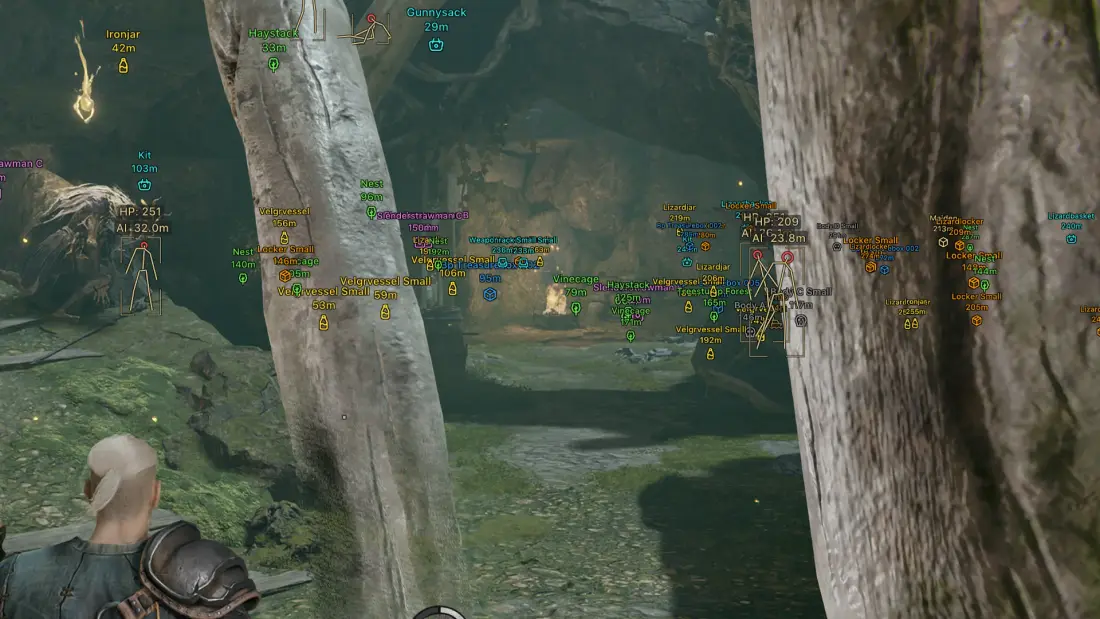
Arcane for Mistfall Hunters — a solid solution for the new game, featuring everything you need for comfortable raid runs and gaining additional environmental awareness. At its core is a highly customizable Aimbot with target selection, bone selection, working modes, FOV, and smoothness control. The visual section includes detailed ESP for players and NPCs with boxes, skeletons, nicknames, HP, view direction, distance, team information, and visibility checks. A separate Items ESP helps locate containers, bodies, natural objects, furniture, and items of various rarity categories. For convenience, the menu includes Battle Mode with selective ESP hiding, Fullbright for better visibility in dark areas, an FOV Changer, a custom crosshair, and interface scaling. The menu also supports convenient keybinds for quickly opening the menu.
Features · 79
Aim Bot14
- Enable — turns automatic target aiming on/off
- Aim Key — assigns a key to activate the aimbot
- FOV Size — adjusts the target capture area of the aimbot (configurable)
- Smoothness — adjusts the smoothness of the aimbot aiming (configurable)
- Mode — allows selecting the aimbot operation mode (hold bind, always active)
- Target — allows selecting target categories (players, NPCs)
- Bone — allows selecting the body part to aim at (head, neck, body, pelvis)
- Adaptive FOV — automatically adapts the aimbot capture area
- Draw FOV Border — displays the border of the aimbot working area
- Draw FOV Background — enables fill inside the aimbot working area
- Max Distance — limits the aimbot activation distance (configurable)
- Ignore Teammates — ignore teammates while the aimbot is active
- Ignore Bots — ignore bots while the aimbot is active
- Ignore Knocked — ignore knocked-out players while the aimbot is active
Player ESP (WH)22
- Bounding Box — displays boxes around players
- Box Style — allows selecting box style (full, corners only)
- Fill Box — displays filled boxes around players
- Fill Style — allows selecting box fill style
- Skeleton — displays player skeleton ESP with head point
- Skeleton Thickness — adjusts skeleton line thickness (configurable)
- View Line — displays player view direction
- Line to Enemy — displays a line to the enemy
- Health Bar — displays player health bar
- Health Style — allows selecting health bar display style
- Health Text — displays numeric player health value
- Name — displays player names
- Distance — displays distance to players
- ESP Style — allows selecting ESP display style
- Show Icon — displays player icons
- Show Team — displays player team information
- Visibility Check — determines player visibility and allows separate handling of targets behind obstacles
- Max Distance — limits the maximum display distance of players (configurable)
- Show Knocked — displays knocked-out players
- Show Team ID — displays the squad number of players in the ESP
- Bots — displays bots separately from players
- Bots Transparency — allows you to adjust the transparency of bot ESP boxes
NPC ESP18
- Bounding Box — displays boxes around NPCs
- Box Style — allows selecting box style
- Fill Box — displays filled boxes around NPCs
- Fill Style — allows selecting box fill style
- Skeleton — displays skeleton ESP for bots/NPCs
- Skeleton Thickness — adjusts skeleton line thickness (configurable)
- View Line — displays NPC view direction
- Line to Enemy — displays a line to NPCs
- Health Bar — displays NPC health bar
- Health Style — allows selecting health bar display style
- Health Text — displays numeric NPC health value
- Name — displays NPC names
- Distance — displays distance to NPCs
- ESP Style — allows selecting ESP display style
- Transparency — adjusts ESP element transparency (configurable)
- Visibility Check — determines NPC visibility and allows separate handling of targets behind obstacles
- Show Icon — displays NPC icons
- Max Distance — limits the maximum display distance of NPCs (configurable)
Items ESP18
- Common — displays common rarity items
- Uncommon — displays uncommon items
- Rare — displays rare items
- Excellent — displays excellent quality items
- Epic — displays epic items
- Containers — displays containers (treasures)
- Portable Containers — displays portable containers
- Vessels — displays vessels
- Bodies — displays bodies
- Effigies — displays effigies
- Nature — displays natural objects
- Large Objects — displays large objects
- Furniture — displays furniture items
- Characters — displays characters
- Other — displays other objects
- Distance — displays distance to items
- Transparency — adjusts ESP element transparency
- Max Distance — limits the maximum display distance of items
Other Arcane Mistfall Hunters Features7
- Menu Key — assigns a key to open the menu
- Unload Key — assigns a key to unload the mod menu
- Crosshair — displays an additional crosshair
- DPI Scale — allows changing the ESP interface scale
- Battle-Mode — hides unnecessary ESP elements at the press of a button (configurable)
- Fullbright — improves visibility in dark areas
- FOV Changer — allows changing the camera field of view
Requirements
- Operating system: Windows 10 (21H2, 22H2), Windows 11 (21H2, 22H2, 23H2, 24H2, 25H2)
- Processor: Intel & AMD
- Video card: Nvidia & AMD
- Client: Steam