
Softhub The Division 2
Price
Select option
Quantity
Your key is delivered to your account instantly after payment — no email needed.
Screenshots
How delivery works
The moment your payment clears, your license key is issued and shown on your order page.
The download for this product's loader sits right under your key — no emails, no waiting.
Step-by-step launch instructions for this product are on the same page.
About Softhub The Division 2
Softhub — a high‑quality external tool for Tom Clancy's The Division 2, known for its high stability, excellent optimization, and accurate function performance. The solution has proven itself as a reliable tool with a well‑designed implementation of key features. Its main advantage is a top‑tier aimbot with several modes (Rotation, Silent, Magic Bullet). Target selection is supported (players, NPCs, gadgets), along with FOV adjustment, priority settings, and target locking (Sticky Aim), as well as built‑in recoil control. The aimbot works accurately and consistently, which is especially important in dynamic firefights. ESP is implemented without shifts or delays: players, rogues, NPCs, gadgets, and loot are displayed with full information (health, armor, names, distance). This ensures complete control of the situation on the map. Additional functions for improving weapon efficiency are available: disabling recoil, spread, and sway, accelerated reloading, and increased fire rate. Softhub — a powerful and stable solution for confident gameplay in Division 2.
Features · 45
Aimbot (Aim)14
- Enable — enables or disables the aimbot
- Aim at Players — aimbot targets players
- Aim at Rogue Players Only — aim only at rogue players
- Aim at NPC — aimbot targets NPCs
- Aim at Gadgets — aimbot locks onto gadgets
- Aim Type — select aim type (Rotation, Silent, Magic Bullet)
- Bones — choose body part (Head, Chest, Random)
- Aim Key — aimbot activation key
- Highlight Target — highlights the current target
- FOV Show — displays the aimbot field of view
- FOV — size of the aimbot field of view
- Sticky Aim — keeps aim locked onto target
- Enable RCS — enables recoil control
- Priority — choose target priority (Crosshair, Distance)
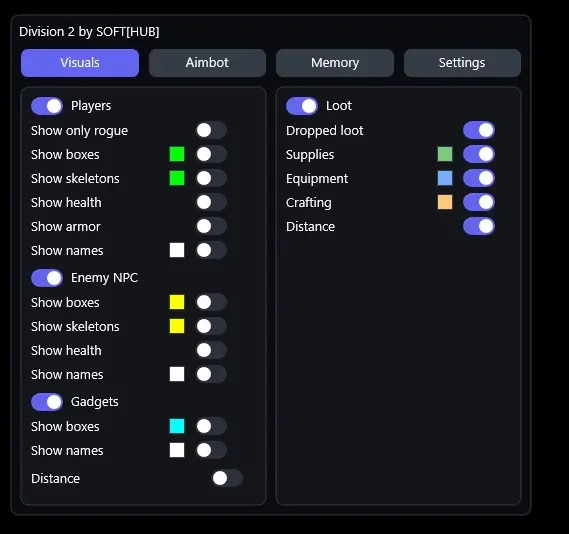
Players ESP7
- Players — enables player ESP
- Only Rogue — shows only rogue agents
- Boxes — displays 2D boxes
- Skeletons — displays skeletons
- Health Bar — shows health bar
- Armor Bar — displays armor
- Names — shows nicknames
Enemy NPC5
- Enemy NPC — enables NPC ESP
- Boxes — displays boxes on NPCs
- Skeletons — displays skeleton
- Health Bar — shows health
- Names — shows names
Gadgets ESP4
- Gadgets — enables gadget ESP
- Boxes — displays boxes
- Names — shows names
- Distance — displays distance
Loot ESP6
- Loot — enables loot ESP
- Dropped loot — shows dropped loot
- Supplies — displays supplies
- Equipment — shows equipment
- Crafting — displays crafting materials
- Distance — shows loot distance
Other Softhub TD2 Features9
- Players Max Distance — max distance for player ESP
- NPC Max Distance — max distance for NPC ESP
- Loot Max Distance — max distance for loot ESP
- No Recoil — removes weapon recoil
- No Spread — removes bullet spread
- No Sway — removes weapon sway
- Fast Reload — speeds up reload
- Increase Fire Rate — increases fire rate
- Rendering Speed — allows you to increase the rendering speed of ESP (if you have problems with it
Requirements
- Operating system: Windows 10, Windows 11 (21H2, 22H2, 23H2, 24H2, 25H2)
- Processor: AMD & Intel
- Video card: AMD & NVIDIA
- Client: Steam, Ubisoft Connect (UPlay), Epic Games